Integrations and shared platform · Shared interaction design and accessibility
Shared controls that survive real workflows
Source-reviewed technical draft. Diagrams and walkthroughs use abstract or invented inputs. Implementation, reported use and measured outcomes remain separate.
I contributed shared interface primitives and navigation behavior across Atlas. The operational problem was consistency: the same application shell, dropdown, modal and theme should remain understandable as users move between tools. Fixing a control in one screen is useful. Giving several screens a clear shared contract is more durable.
The details are where that contract either holds or breaks.
Make navigation follow focus
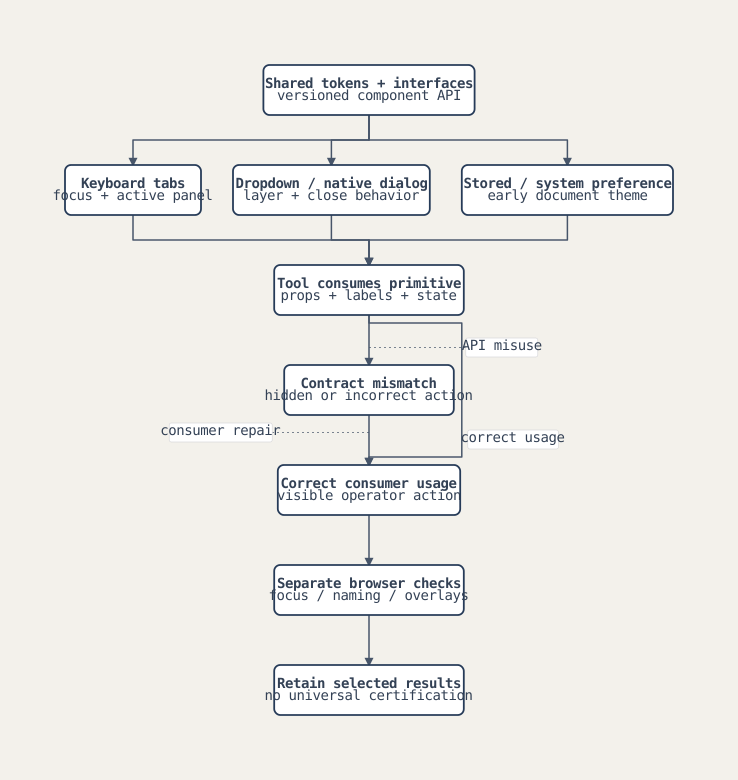
The authored change adds keyboard behavior and tab relationships in selected navigation components. The inspected TabBar patch handles left and right arrows, wraps across the tab list, focuses the next button and activates its destination. The active tab has a tab index of zero; other tabs have minus one. IDs, selected state and panel relationships make the connection explicit.
I would demonstrate focus and activation together. A visually selected tab and a keyboard-focused tab should not drift apart without an intentional interaction model. This patch supports those particular relationships; I do not claim every keyboard convention, assistive-technology combination or Atlas screen was tested.
Give overlays a shared vocabulary
The authored change moves selected shared primitives to TypeScript and introduces a defined layering scale. Card, dropdown, modal, popover, toast and other overlay levels receive named tokens rather than unrelated escalating values. The modal uses the native dialog API, routes its cancel event through the close callback and makes backdrop closing configurable.
I keep the browser behavior and the component contract separate.
Using showModal() lets the browser participate in modal behavior. It does not prove that every consumer supplies a useful accessible name, restores focus correctly or handles nested overlays without problems. The inspected modal also changes body overflow and clears it on cleanup; a complete nested-modal strategy would need to account for other consumers of that shared state.
The typed SearchableSelect exposes option and callback interfaces. Its inspected implementation filters by label, caps the visible list, excludes disabled options from keyboard selection and closes after a selection. It focuses the search field when opened and scrolls the focused option into view. Some value types remain permissive; a TypeScript file extension does not establish full runtime validation.
Inspect the system diagram
Apply theme before hydration
The same modernization PR persists the selected theme and adds a document-head script that applies the stored or system theme before the application hydrates. Shared color tokens can also be resolved into computed values for SVG chart properties, with a fallback when the browser is unavailable.
I can explain the intended behavior: avoid rendering the wrong theme while waiting for client settings. I cannot attach a measured flash reduction or universal hydration result to the inspected code. Storage failures are caught, and theme preferences can still change after the initial document decision.
A consumer can break a shared control
The later Signature Generator work supplies a concrete consumer lesson. Its selected September revision fixes a Tooltip contract misuse that hid an action. The August shared Tooltip and that later revision expose different interfaces. I keep those versions separate rather than inventing one permanent API for the whole history.
Shared components still need consumer verification.
Invented browser walkthrough
- Open fictional Operations and Reporting tabs. Use arrow keys and observe both focus and active destination.
- Open a dropdown with disabled and matching options. Filter, move with the keyboard and select an enabled item.
- Open a native-dialog modal, then exercise cancel and backdrop behavior separately.
- Start with a stored dark preference and inspect the document's initial theme decision.
- Reconstruct a mismatched Tooltip consumer and compare it with the corrected version-specific usage.
This sequence uses invented labels. It is a planned component demonstration, not evidence that these interactions were rerun against every Atlas consumer.
Contribution and result
The authored patches establish concrete keyboard, shared-component, token and early-theme contributions. I do not turn that into a claim of entire design-system authorship, universal accessibility compliance or measured usability improvement. The strongest result is an inspectable reusable contract and a set of identifiable consumer fixes.
For an interview, I would connect these details to the work of deploying an internal tool. Operators need to use it repeatedly, across screens and input methods. Consistency is part of making the automation usable.
Discussion notes
Three-minute outline. a repeated operator task; keyboard tab behavior; shared overlays and theme; a concrete consumer contract failure; the browser checks still required.
Questions to prepare. Which behavior belongs in the primitive? What should a consumer provide? How do nested overlays share scroll state? How do you verify focus without assuming a library guarantees it? How do component API changes reach existing consumers?
Application summary. I contributed shared controls, keyboard navigation, overlay tokens and early theme handling across an operational platform. I can explain both the reusable interface and the consumer failures that still require browser verification. That gives me a practical way to make customer-facing automation consistent and usable beyond its backend implementation.
This contribution narrative is supported by privately held source and authorship records. It contains original explanations and abstract diagrams, without employer code, customer records or runtime telemetry. Missing outcome evidence stays explicit.